FortiGate Need Format 경고가 떴을 떄
FortiGate에 ‘Log hard disk: Need format’가 표시될 때 취해야 할 단계
Need format의 경우 하드디스크가 장착된 포티게이트에 로그가 표시되지 않을 때 필요로 합니다
FortiGate get system status 명령어를 통해 Log hard disk: Need format 문구 확인이 가능합니다
문구가 표시되면 먼저,
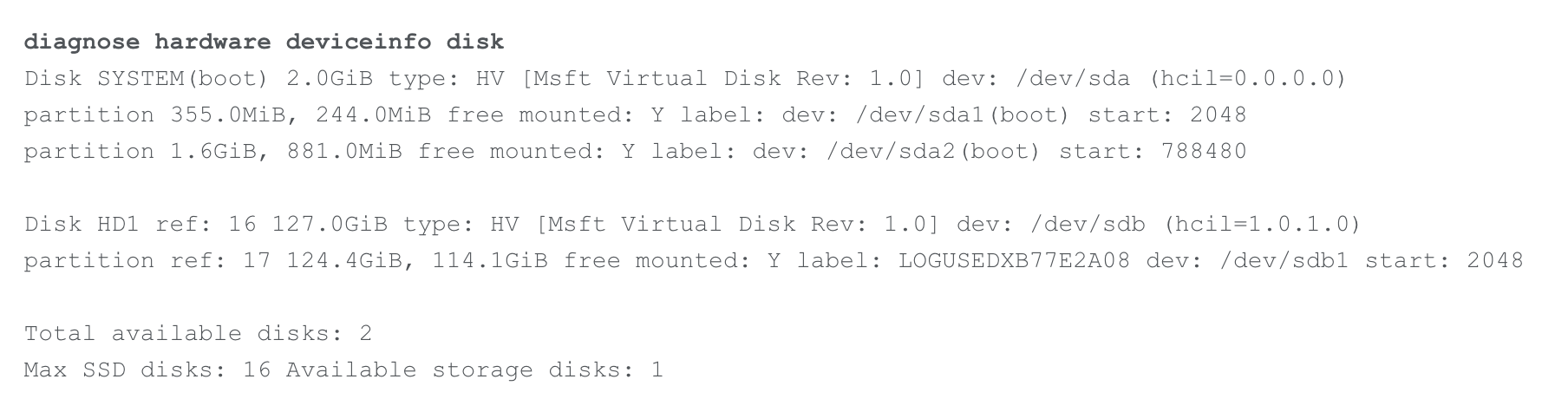
diagnose hardware deviceinfo disk 명령어를 통해 마운트가 되어 있는지 확인합니다.
그 다음 사용 가능 공간(Free) 확인
- 디스크 사용 공간이 있다면 xxGiB/xxMiB free 식으로 표기
추가로 2개의 디스크는
/dev/sda → 부팅 시스템(시스템 디스크)
/dev/sdb → 로깅(로그 디스크)
출력물상 이상이 없으면 로그를 백업하고 디스크포맷을 진행해야 합니다.
- 로그 백업 관련 링크
Standard procedure to format a FortiGate Log Disk, log backup from disk
the standard procedure to format a FortiGate Hard Disk, which is used for logging purposes.If the procedure fails, refer to this article: Technical Tip: Advanced procedure to format a FortiGate hard disk. Scope FortiGate (all versions). Solution Note 1: If
community.fortinet.com
로그 백업이 완료되면 디스크포맷을 진행합니다.
포맷을 진행하고도 로그가 보이지 않는다면.. RMA를 진행하는 게 좋을 것 같습니다^^
FortiGate Need Format 경고가 떴을 때
'IT > FortiGate' 카테고리의 다른 글
| FortiGate 7.6.5 업그레이드 후 관리자 비밀번호 변경 요구 (1) | 2026.01.03 |
|---|---|
| 포티게이트 SSL VPN Revoked by Android: REBOOT 에러 해결 방법 (0) | 2025.12.31 |
| FortiGate 특정 관리자 Password Policy(Password Expire) 적용 제외하는 방법 (0) | 2025.07.22 |
| FortiGate Extended EOS & Long Term Support란 (0) | 2025.07.17 |
| FortiGate HA 구성 시 다른 계정 등록으로 인한 라이선스 업데이트 실패 (1) | 2025.07.15 |


