반응형
FortiClient EMS 인증서 FortiGate에 설치하기
FortiClient EMS의 인증서를 FortiGate에 설치가 필요한 이유는
- FortiGate와 FortiClient EMS의 연동
- ZTNA 사용 시 FortiClient의 정보가 EMS를 통해 FortiGate로 전달될 때 해당 정보들이 암호화로 전달되어야 함
1. FortiClient EMS 인증서 다운로드
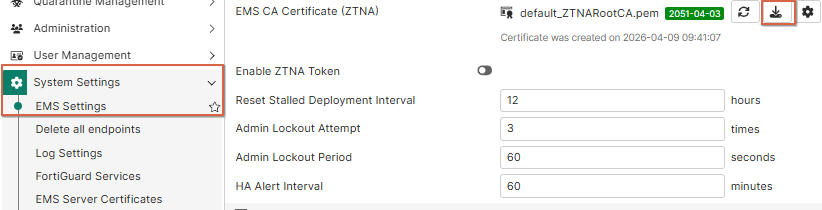
- FortiClient EMS 접속 후 System Settings > EMS Settings > EMS CA Certificate (ZTNA)에서 다운로드 표시 클릭
2. FG에 인증서 업로드
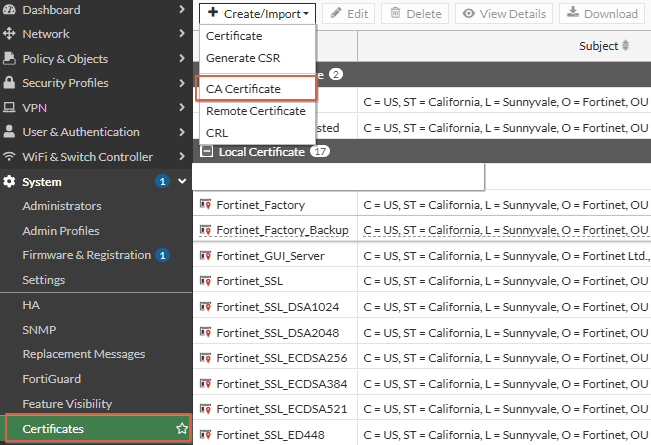
- FortiGate GUI > System > Certificates > Create/Import > CA Certificate

- File Upload
해당 작업들은 Edge 브라우저에서 작업해줘야 합니다
FortiClient EMS 인증서 FortiGate에 설치하기
반응형
'IT > FortiGate' 카테고리의 다른 글
| FortiGate Installed Firmware Contains a Critical Vulnerability 알림 비활성화 (1) | 2026.06.01 |
|---|---|
| FortiGate Session에서 offload 값 (1) | 2026.04.20 |
| FortiGate Debug 예시 (0) | 2026.04.06 |
| FortiGate에서 Slack 알림 연동하기 (0) | 2026.03.18 |
| FortiGate에서 네트워크 장치 특정 포트가 열렸는지 확인하는 방법 (0) | 2026.03.17 |

